Table of Contents:
Most business messaging platforms ask you to commit before you see anything. You book a demo, sit through a slide deck, and wait on a quote.
The nativeMsg free plan works the other way around. You build your branded messaging experience first, put it on your own phone, and only pay once you’re ready to reach real customers. Here’s what the free plan includes, where its limits are, and what happens when you launch.
What’s included in the free plan
The free plan is simply called Build, and it costs $0 with no time limit. It includes:
- One branded RCS agent in a sandbox. Your business name and logo, inside a working messaging experience.
- Five test devices. Register your phone and up to four more, and send to them as often as you like.
- The experience builder with ExperienceAI. Describe what you want in plain language, like “greet the customer, ask for their order number, and show delivery updates,” and ExperienceAI builds a working flow you can edit step by step.
- The full API. Developers can connect it to your systems and test real triggers before anything goes live.
That’s enough to build the experiences that matter most: inbound flows that turn a QR scan or ad click into a conversation, and outbound messages like cart reminders, appointment confirmations, and order updates.
What the free plan doesn’t do
The only real restriction here is that you can't send to actual customers with the Build tier. Messages can only go to your five registered test devices.
The reasoning is because in order to send messages to the masses, your verified brand requires mobile carrier verification, a fallback number for phones that can’t receive RCS, and a lot of compliance work that we handle in the background for you. Those come with the paid plans. Build gives you everything you need to decide whether it’s worth doing that.
How to get the most out of the free plan
You can have something working on your phone in minutes. A good first session looks like this:
- Pick one use case. Choose the message that matters most to your business today, like a cart reminder, an appointment confirmation, or a delivery update.
- Describe it to ExperienceAI. Write one or two sentences about what the customer should be able to do.
- Send it to your phone. Tap through every button the way a customer would.
- Add the people who’ll decide. Use your other four test devices for your manager, your marketing lead, or whoever signs off. Seeing it on their own phone does more than any slide.
- Edit and resend. Change the wording, swap images, add a branch, and test again.
What happens when you launch
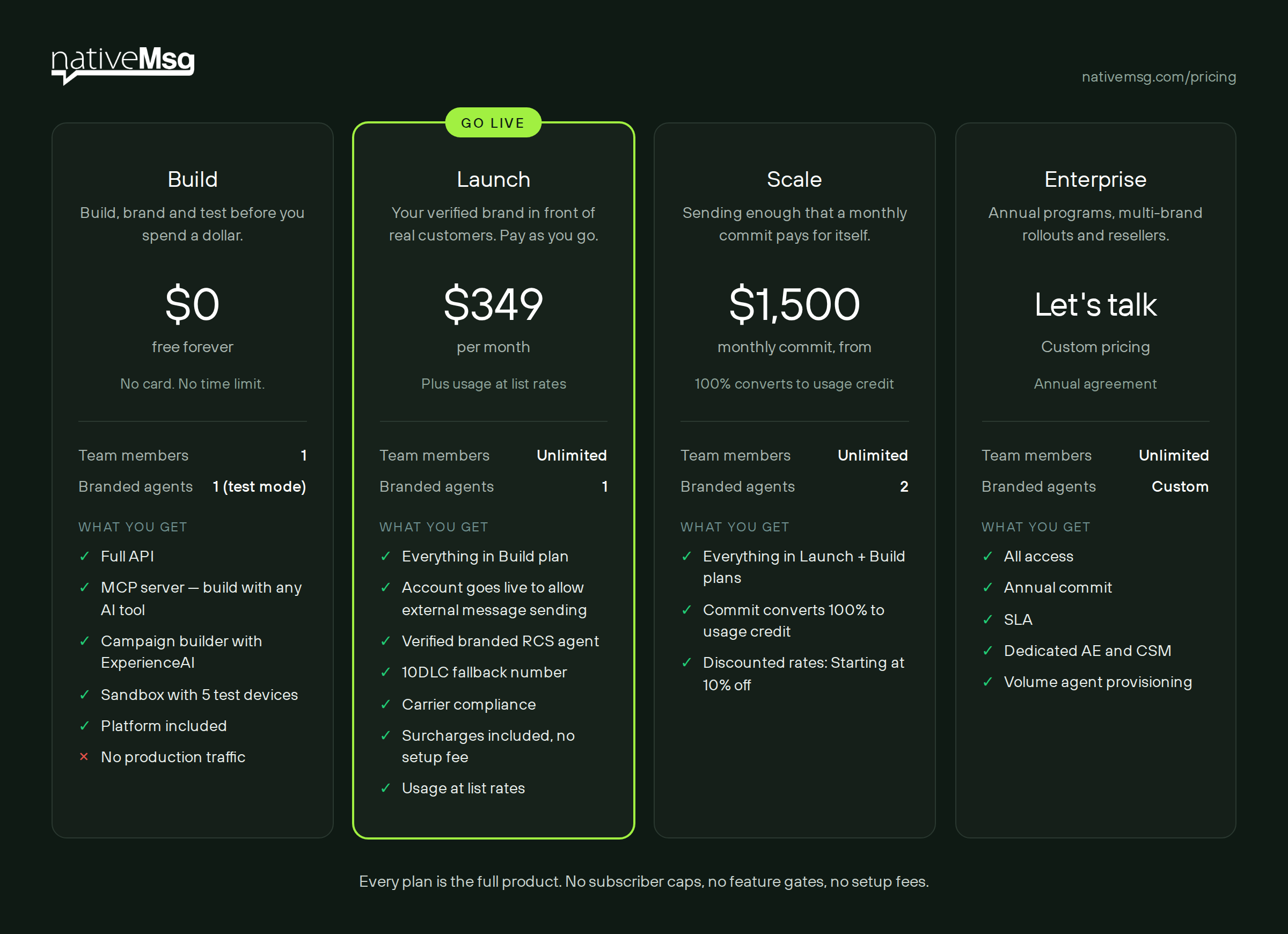
When you’re ready to reach real customers, you move to a paid plan. Everything is built around one idea: pay to be on the network, then pay only for what runs. You can check out our pricing plans and messaging rates now, but here's a quick overview:
How usage is billed
On paid plans, usage is counted in two ways:
- Sends. A single message counts as a send. Messages that fall back to SMS or MMS always bill per send.
- Sessions. When a back-and-forth reaches its fourth message, the exchange becomes a session. The whole 24-hour window then bills as one session, however long the conversation runs.
That means a real support thread or a back-and-forth with a customer doesn’t get more expensive the longer it goes.
When does Scale make sense? Once your usage reaches about $1,200 a month, the Scale commit typically costs less than Launch plus list-rate usage.
How long until you can reach customers?
You can build and test on the free plan today. Going live requires mobile carrier (AT&T, T-Mobile, Verizon, etc.) verification of your brand, which can take a few weeks. The nice part is you can build and test everything you need in the meantime, so once your channel is approved, you can send in seconds.
Frequently asked questions
Is the nativeMsg free plan really free?
Absolutely. Build costs $0 with no time limit. You only pay when you launch to real customers.
What happens to what I build on the free plan?
Your experiences carry over when you upgrade, so you don’t rebuild anything to go live.
Can my team use the free plan?
Build includes one seat, but you can add up to five test devices, including your teammates’ phones, so they can see and tap through what you’ve built.
What does it cost to send to real customers?
Launch is $349 a month plus usage at list rates. Scale starts at a $1,500 monthly commit that converts entirely to usage credit at discounted rates.
Do I need a fallback number?
Yes, so customers whose phones can’t receive RCS still get your messages. A 10DLC fallback number is included on Launch and Scale.
Put your brand on your phone today
Build your first experience, send it to your phone, and show it to the people who decide, all before you spend anything.