
Table of Contents:
Branded messaging got a major upgrade. Messages can now arrive from a verified brand with a logo, images, video, carousels, and buttons, all in the phone's default messaging app.
Most brands are using that upgrade to send prettier versions of the same texts they always sent. A product photo and a link. A nicer delivery notice. A card with a logo on it.
That's a brochure. It gets read, and then it's done.
The bigger opportunity is to send something customers can use: an application that runs inside the conversation. They can browse, choose, book, pay, and get help without leaving the thread.
What's the difference between a message and an application?
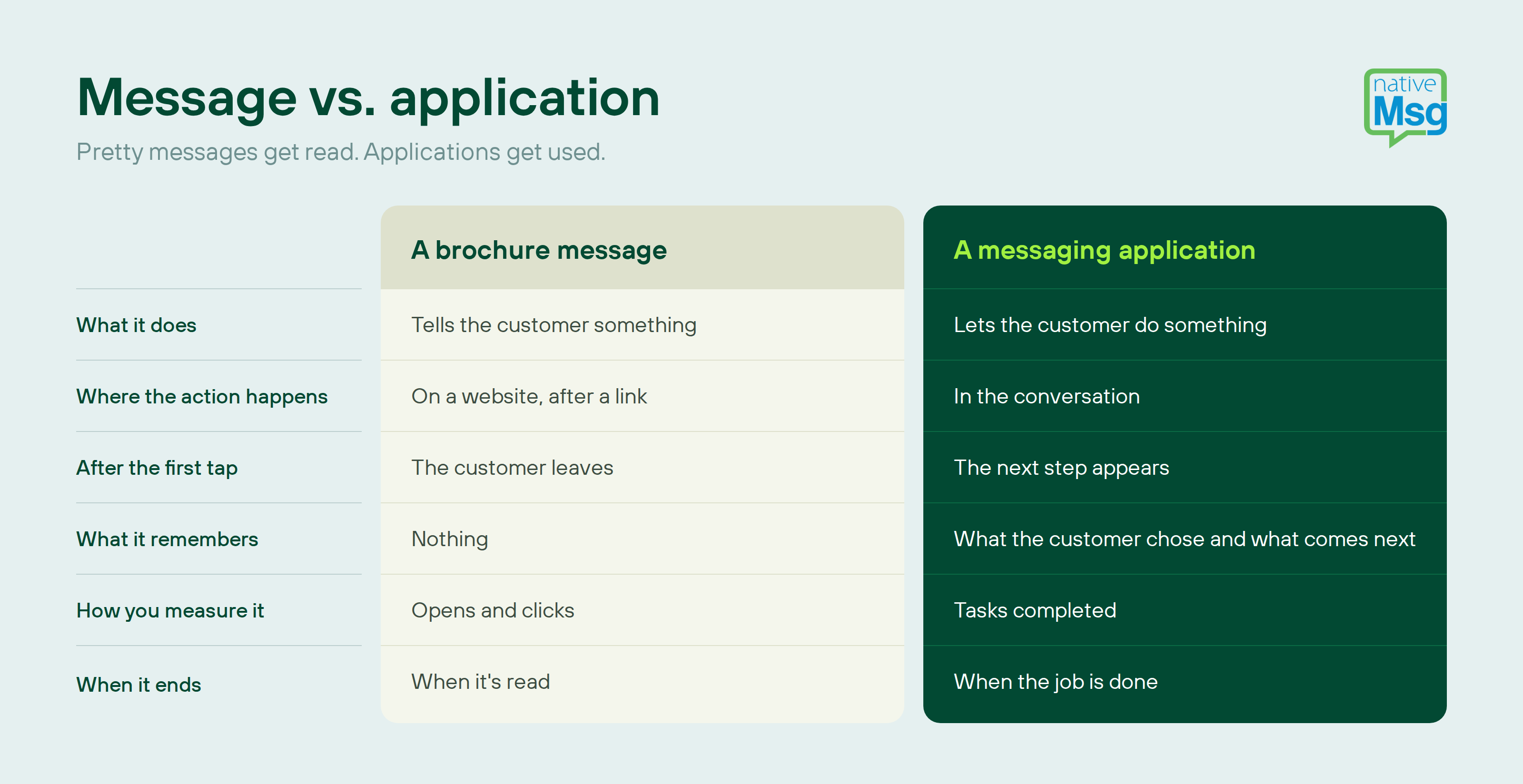
A brochure message is one-way even when it looks good. An application is built around an outcome: a confirmed appointment, a completed order, a solved problem.
Why do most branded messages stop at "pretty"?
Because most messaging programs were built around SMS and email, where the message's only job was to get someone to click through to somewhere else. The website did the real work.
Two habits carried over:
- The campaign mindset. Teams plan sends, not experiences. The question is "what should we say?" instead of "what should customers be able to do?"
- The open-rate scoreboard. If success means opens, a prettier message looks like a win. But a message that's opened and then abandoned hasn't done anything.
What does a messaging application look like?
Here are four common messages rewritten as applications, two inbound and two outbound.
The delivery update (outbound)
Brochure: "Your order has shipped!" with a tracking link.
Application: A tracking card with the delivery window, plus buttons to change the delivery date, leave instructions for the driver, or add a related item to the next order. The customer handles everything in the thread.
The offer (outbound)
Brochure: A product image and "Shop now."
Application: A carousel the customer swipes through, picks a size or color, and checks out from, with a "Remind me later" option for anyone not ready yet.
The QR code (inbound)
Brochure: A QR code on packaging that opens a landing page, where most visitors leave.
Application: A QR code that opens a branded conversation, asks two tap-to-answer questions, captures opt-in, and offers the right next step, like registering a product, reordering, or getting setup help.
The "contact us" moment (inbound)
Brochure: A "Text us" line that leads to a plain-text exchange, or worse, a phone number.
Application: A menu of the top three things customers need, instant answers for the common ones, and a handoff to your team with the context already attached.
The difference isn't the design. It's that the conversation keeps going until the customer's task is done.
Is conversational messaging the same thing?
Close, but not quite. Conversational messaging means two-way communication, where customers can reply and a brand can respond. That's necessary, but it isn't enough on its own.
An open-ended "Reply with any questions!" is conversational, but it gives the customer no structure. A messaging application adds the structure: clear choices, logic that responds to each answer, and a defined outcome. It's conversational messaging with a purpose.
Why no app download matters
Customers are tired of downloading apps. Every brand wants a spot on their home screen, and most don't get one. App fatigue is real, and even customers who do install an app often turn off its notifications.
A messaging application skips all of that. It runs in the messaging app every customer already uses, so it reaches people who would never download your app. And when the task is done, there's nothing left behind to delete.
How do you turn a message into an application?
Ask four questions about any message you send today:
- What should the customer be able to do after reading this? If the answer is "click a link," start there.
- Can they finish it here? Move the action into the thread with buttons, carousels, and quick replies.
- What happens after each tap? Plan the next step for every choice, including "not now."
- Where does the answer go? Connect the result to your CRM, commerce platform, or scheduling system so the next message reflects what the customer did.
Then change what you measure. Count completed tasks, not opens.
Frequently asked questions
What is conversational messaging?
Two-way communication between a business and its customers in a messaging app, where customers can reply and the business can respond.
What is interactive text messaging?
Messages that include tappable elements, like buttons, carousels, and quick replies, so customers can take action without typing or leaving the conversation.
Do messaging applications work on every phone?
They work on RCS-capable phones, which is about 90% of the US. For the rest, nativeMsg automatically delivers the message as SMS or MMS.
Do I need developers to build one?
No. Describe what you want in plain language and ExperienceAI builds the flow in the visual builder, where every step stays editable.
Build an application, not a brochure
If you can dream it, you can build it. Describe the experience you want customers to have, and ExperienceAI turns it into a working application you can tap through on your own phone in minutes, free.