
Table of Contents:
RCS (Rich Communication Services) is the messaging standard that upgrades SMS. Messages travel over Wi-Fi or mobile data through the carrier's RCS infrastructure and land in the phone's default messaging app, enabling verified business senders, read receipts, and media like image carousels, videos, and action buttons.
Now that we got the technical version out of the way, this post is about how it actually works, and what it means for a business that wants to reach customers in the inbox they already use every day.
What is RCS, and who created it?
RCS is an open messaging standard developed by the GSMA, the body that represents mobile operators worldwide. It was designed as the successor to SMS. Google drove early adoption through its Messages app on Android. The turning point came in late 2024, when Apple added RCS support to the iPhone. For the first time ever, the standard worked across both major mobile platforms, which is what moved RCS from a promising idea to a channel businesses can now actually plan around.
How is RCS different from SMS?
SMS is limited to 160 characters of plain text, sent over the legacy cellular network, with no way to know whether anyone read it. RCS runs over the internet instead, which removes those limits and adds the features people expect from a modern messaging app:
- Longer messages and two-way conversations
- Media: image carousels, videos, PDFs, audio clips, and tappable action buttons
- Read receipts and typing indicators
- A verified business account that immediately shows your name and company logo instead of a random, unknown number
For a business, the verified account is the part that changes the relationship because the customer can see exactly who is messaging them before they read a word.
How does an RCS message actually get delivered?
The path looks like this:
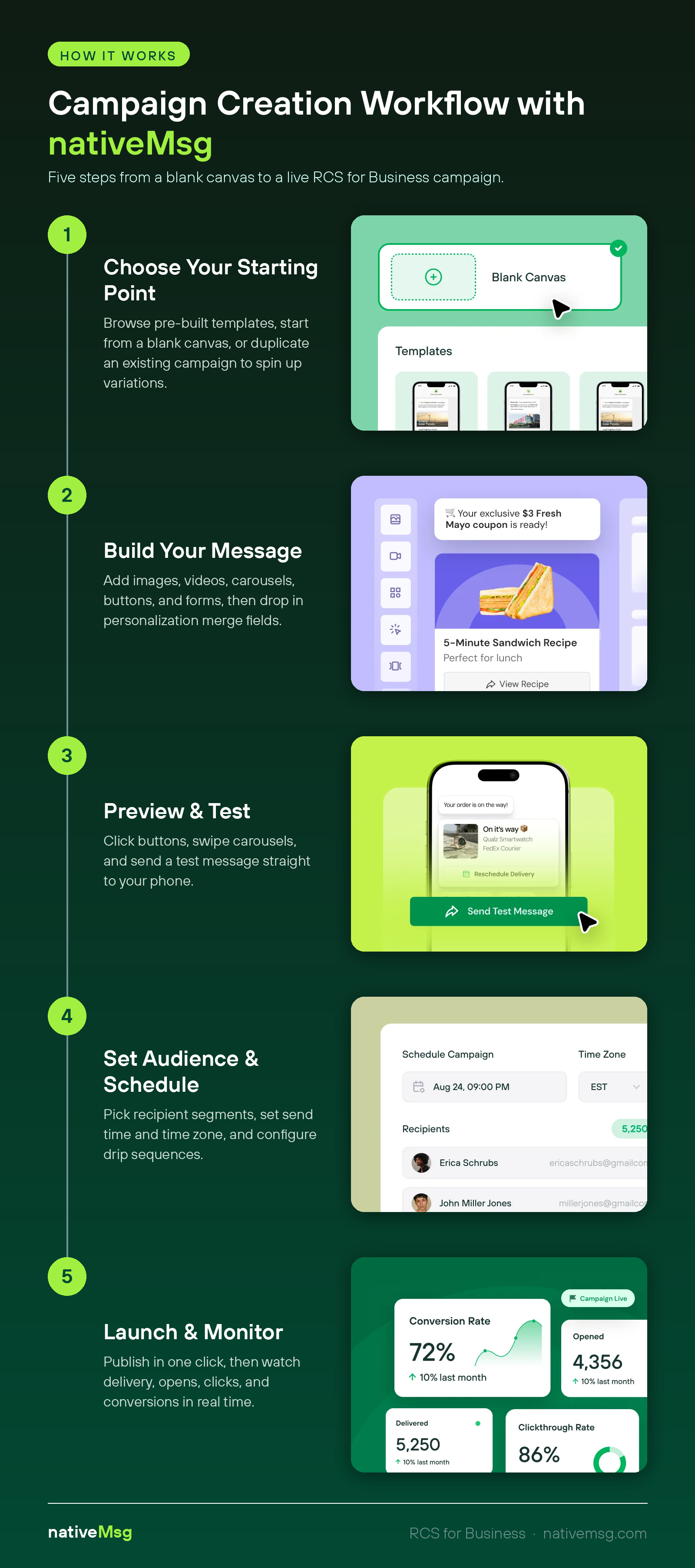
- A business sends a message through a messaging platform like ours (nativeMsg, hi!)
- The message routes through the carrier's RCS infrastructure, where the verified sender identity is applied
- It's delivered over Wi-Fi or mobile data into the customer's default messaging app, the same app they already use for texts
There's nothing for the customer to install and no separate inbox to check. It simply arrives where their messages already live.
What happens if a device doesn't support RCS?
Not every device, carrier, and market supports RCS yet, so delivery isn't universal…yet. This is where SMS fallback matters: when a customer can't receive an RCS message, it's delivered as an SMS instead. You reach the customer either way. When they upgrade their phones and RCS is finally enabled, they’ll immediately start receiving the upgraded messages. But the SMS fallback is a good safety net in the meantime.
That fallback is why RCS is something you can roll out now rather than wait on. You're never choosing between reach and capability because you can have both at the same time.
What can a business send over RCS?
The clearest way to think about it is by direction — outbound and inbound.
Outbound (brand-initiated). Your business starts the conversation: an offer, an appointment reminder, a status alert, a confirmation, whatever you need. Those messages carry your verified identity and let the customer act right inside the thread instead of jumping to a separate app or page. This keeps them engaged without friction.
Inbound (customer-initiated). The customer starts the conversation with your brand. They scan a QR code, click on a paid ad, or follow a link, and a verified RCS message opens up. That becomes a lead-capture moment as well because you can collect consent and details conversationally and pass them straight into your CRM systems without requiring a form fill.
In our experience, most businesses use both for different strategies. Outbound keeps customers informed and moving; inbound turns interest into a conversation you own.
Does the customer need to do anything?
No! RCS works in the default messaging app already on their phone, and on most modern devices it's turned on by default. There's no download, no sign-up, and no new app to learn, which is exactly why the channel removes the adoption hurdle that holds other channels back.
Where is RCS going next?
The standard keeps maturing. Security has tightened with newer versions of the GSMA Universal Profile, and the next stage (RCS 4.0) is set to make the experience feel even more seamless. If you're evaluating RCS now, it's worth understanding both how secure RCS business messaging is and what RCS 4.0 will bring.
Want to see what an RCS conversation looks like from the customer's side? Take our interactive guide and walk through it yourself.
Frequently asked questions
Is RCS the same as iMessage? No. iMessage is Apple's own service for Apple devices. RCS is an open standard that works across both Android and iPhone, so a business can reach customers on either platform from one channel.
Do customers need an app to receive RCS? No. RCS arrives in the default messaging app already on the phone. Nothing to download or install.
What's the difference between RCS and RCS for Business? RCS is the underlying standard people use to message each other. RCS for Business (also called RBM since it used to be called RCS Business Messaging) is the business-facing version, where verified brands send messages and build two-way experiences with customers.
Does RCS replace SMS? Not entirely. RCS is the upgrade, but SMS remains the universal fallback for devices and carriers that don't support RCS yet, which is why platforms like ours send over RCS and fall back to SMS automatically. We want to make sure your messages reach everyone you want them to.